How to use fall detection to stay safe living at home
Understanding what fall detection can do for you
Living independently often means managing small risks that come with daily life. One of the most common concerns for older adults or people with reduced mobility is the possibility of falling when no one else is around. A personal fall alarm with automatic fall detection can help bridge that gap, giving you a way to call for help even if you cannot reach a phone or press a button. This article walks through the practical steps of setting up and using such a device so that it becomes a natural part of your routine rather than something you think about only after a problem.
Step 1: Choose the right device for your daily life
The first step is selecting a fall detection system that fits how you actually move through your home and day. Not all devices work the same way. Some are worn as an alert pendant around the neck, others as a wristband or clipped to a belt. Consider what feels comfortable for long periods. If you tend to forget jewellery or dislike things around your neck, a wrist model might suit you better. Look for a device that is water-resistant if you want to wear it in the shower or while washing dishes. Water resistance matters because many falls happen in the bathroom, and you do not want to remove the device at the very moment you might need it.
Also check whether the device uses cellular or Wi-Fi signals. A personal fall alarm that relies on a home Wi-Fi network may stop working during a power cut. A cellular model, by contrast, keeps working as long as the mobile network is up. Think about where you spend most of your time. If you garden or check the mailbox, make sure the device has enough range or a portable base unit that stays with you. At this stage, the goal is to pick something you will actually wear every day, not leave in a drawer.
Step 2: Set up the device correctly in your home
Once you have your device, take the time to set it up properly. Start by charging it fully according to the instructions. Many fall detection units need an initial charge that can take several hours. Do this in a place where you will not forget it, such as next to your bed or by the kettle. Next, download any companion app if the system uses one, and register your account. Enter your emergency contacts carefully. Double-check phone numbers, especially for family members or neighbours who live close by.
Place the base station or charging dock in a central location. Avoid hiding it behind furniture or inside a cupboard, because the device needs a clear signal to communicate. If your system includes a wall-mounted help button for the bathroom or bedroom, mount it at a height you can reach easily from the floor. Test the range by walking to every corner of your home and pressing the test button. Pay attention to dead spots, such as a basement or a room with thick stone walls. If the signal drops there, consider moving the base unit or using a signal extender.
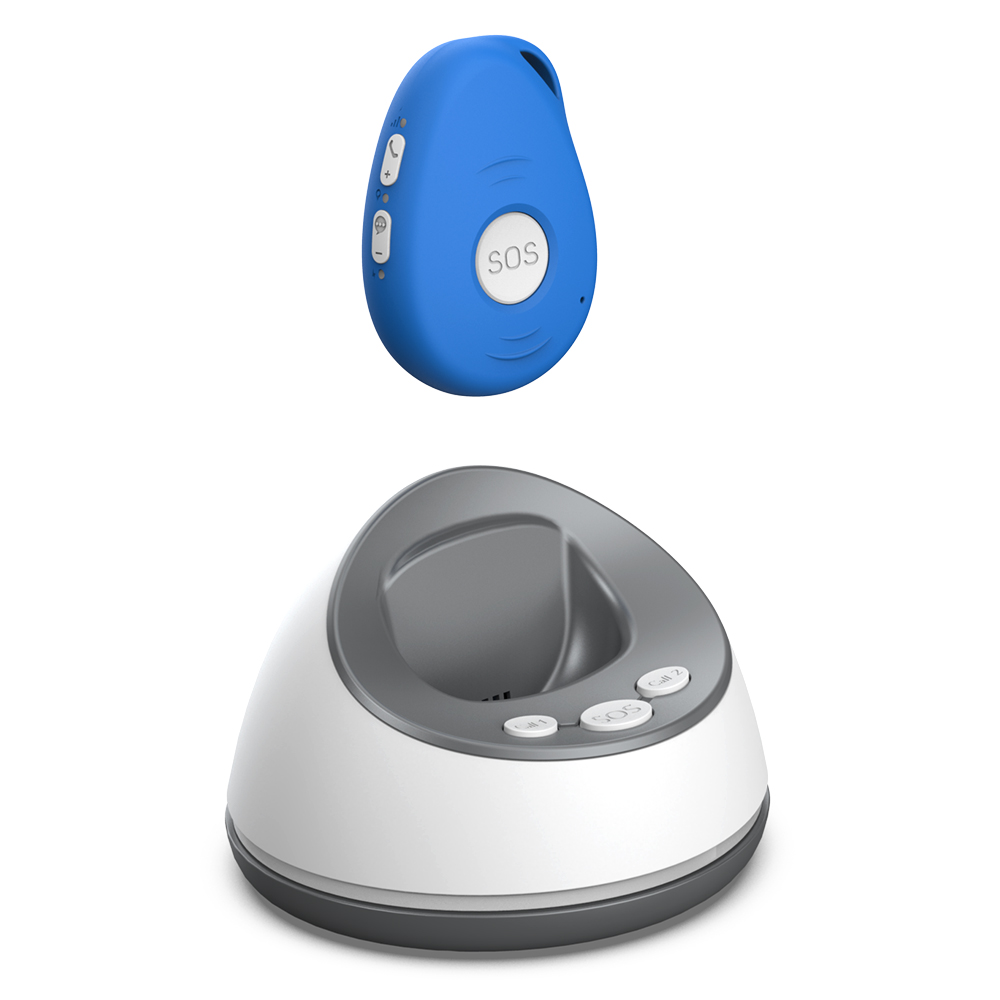
One thing to watch at this stage is the placement of the device when you are not wearing it. If you take it off at night, put it on the bedside table, not across the room. A fall in the dark is just as likely as one during the day, and you want the device within arm's reach.
Step 3: Wear it consistently and check the fit
The biggest hurdle with any fall detection system is remembering to wear it. Make it part of your morning routine, the same way you put on glasses or a watch. Clip the pendant to your clothing before you get out of bed, or put on the wristband while you brush your teeth. If the device uses an alert pendant, adjust the cord so it hangs at chest level. A cord that is too long can swing and trigger false alarms, while one that is too short may be uncomfortable under a collar.
Check the fit of wristbands regularly. Skin can change with the seasons, and a band that was snug in winter might be loose in summer. A loose wristband may not detect a fall accurately because the sensor needs consistent contact with your body. Also keep the sensor area clean and dry. Moisture or dirt can affect how the accelerometer reads sudden movements. If the device has a removable cover or strap, wash it according to the manufacturer's instructions, but avoid submerging the electronics unless the device is rated for it.
At this step, be patient with yourself. It can take a week or two to build the habit. Some people find it helpful to keep a spare device in a different room so they never have to walk back to fetch it. Others use a small hook by the front door as a visual reminder. The important thing is that the device becomes as automatic as locking the door behind you.
Step 4: Understand how fall detection works in practice
Fall detection relies on sensors that measure acceleration and orientation. When the device detects a sudden downward movement followed by impact and then a period of no movement, it triggers an alert. This is different from a manual activation, where you press a button yourself. The automatic feature is designed for situations where you cannot press anything, such as after a hard fall or if you lose consciousness.
That said, no system is perfect. Sudden movements like dropping onto a sofa, bending over quickly, or even a hard sneeze can sometimes trigger a false alarm. If that happens, most devices give you a short window, usually 15 to 30 seconds, to cancel the alert before it goes through. Learn where the cancel button is on your model. Practice cancelling a false alarm so it becomes muscle memory. A few devices also let you set the sensitivity level. If you experience frequent false alarms, try lowering the sensitivity. If you are worried about a fall not being detected, increase it. There is a trade-off between catching every real fall and avoiding nuisance calls to your emergency contacts.

Another thing to watch is the response time once an alert is sent. Some systems connect directly to a monitoring centre that calls you back. Others send a text or app notification to your family. Know which type you have and how long it typically takes for someone to respond. If you live alone, a monitoring centre can provide quicker support after an unexpected fall because they are staffed around the clock. If you have family nearby, a direct notification might be enough, but only if they can answer their phone at any hour.
Step 5: Test the system regularly and involve your support network
A device that sits unused or untested is no help at all. Set a recurring reminder, perhaps on the first day of each month, to run a full test. Press the help button and wait for the confirmation that the alert was received. If the system uses a monitoring centre, call them to confirm they got the test signal. Also ask your emergency contacts to confirm they received any notifications. This simple check can reveal problems like a dead battery, a weak signal, or a contact number that has changed.
Involve the people who would be called in an emergency. Explain to them how the system works and what they should do when they get an alert. Should they call you first? Should they come to your home? Should they contact a neighbour? Having a clear plan reduces panic and confusion on both sides. Write down the steps and keep a copy near your phone or on the fridge. This is especially useful if you have multiple contacts who might not know each other's roles.
Also think about what happens after a fall even if you are not hurt. A near miss, where you stumble but catch yourself, is worth noting. It can signal a change in your balance or a new hazard in your environment. Tell your family or doctor about these episodes. They might suggest a mobility aid, changes to your medication, or simple home modifications like removing loose rugs or improving lighting. The device is a safety net, not a substitute for addressing the root causes of falls.
Step 6: Adapt the setup as your needs change
Your living situation and health can shift over time. A system that worked well a year ago might need adjustments. If you start using a walker or a wheelchair, check that the device still sits securely on your body. Some pendants can snag on a walker frame, so a wristband might be a better choice. If you move to a new home or rearrange furniture, repeat the range test. Thick curtains, new appliances, or a different floor plan can affect signal strength.
If your vision or hearing changes, make sure you can still see the device's indicator lights and hear its alerts. Some models have vibration modes or louder speakers. Contact the manufacturer or your provider to ask about accessibility options. The same goes for your emergency contacts. If a family member moves away or changes their phone number, update the system immediately. An out-of-date contact list can delay support after an unexpected fall by hours.

Finally, do not be afraid to switch devices if yours no longer meets your needs. Technology improves, and newer models may offer longer battery life, better fall detection accuracy, or simpler setup. The goal is not to stick with one device forever, but to keep using a system that actually helps you stay independent.
Living alone or managing health challenges does not mean you have to accept constant worry. A personal fall alarm with fall detection is one tool that can reduce that worry, but only if you choose it carefully, wear it consistently, and test it regularly. By following these steps, you build a safety routine that lets you focus on the things you enjoy, knowing that help is never far away.